The terminal where your agents ship.
Claude Code, Codex, Aider — side by side in split panes, with real git, a real editor and AI code review in the same native window. Supervise the whole fleet at a glance. Free on macOS.
- Native Tauri + Rust, no Electron
- ~13 MB download
- Local-first your code never leaves
- Your keys any AI provider
- Claude Code
- Codex
- Aider
- opencode
- Ollama
- any CLI agent
Live demo — the real UI, simulated in your browser. Click it and drive: tabs, panes, shell, git.
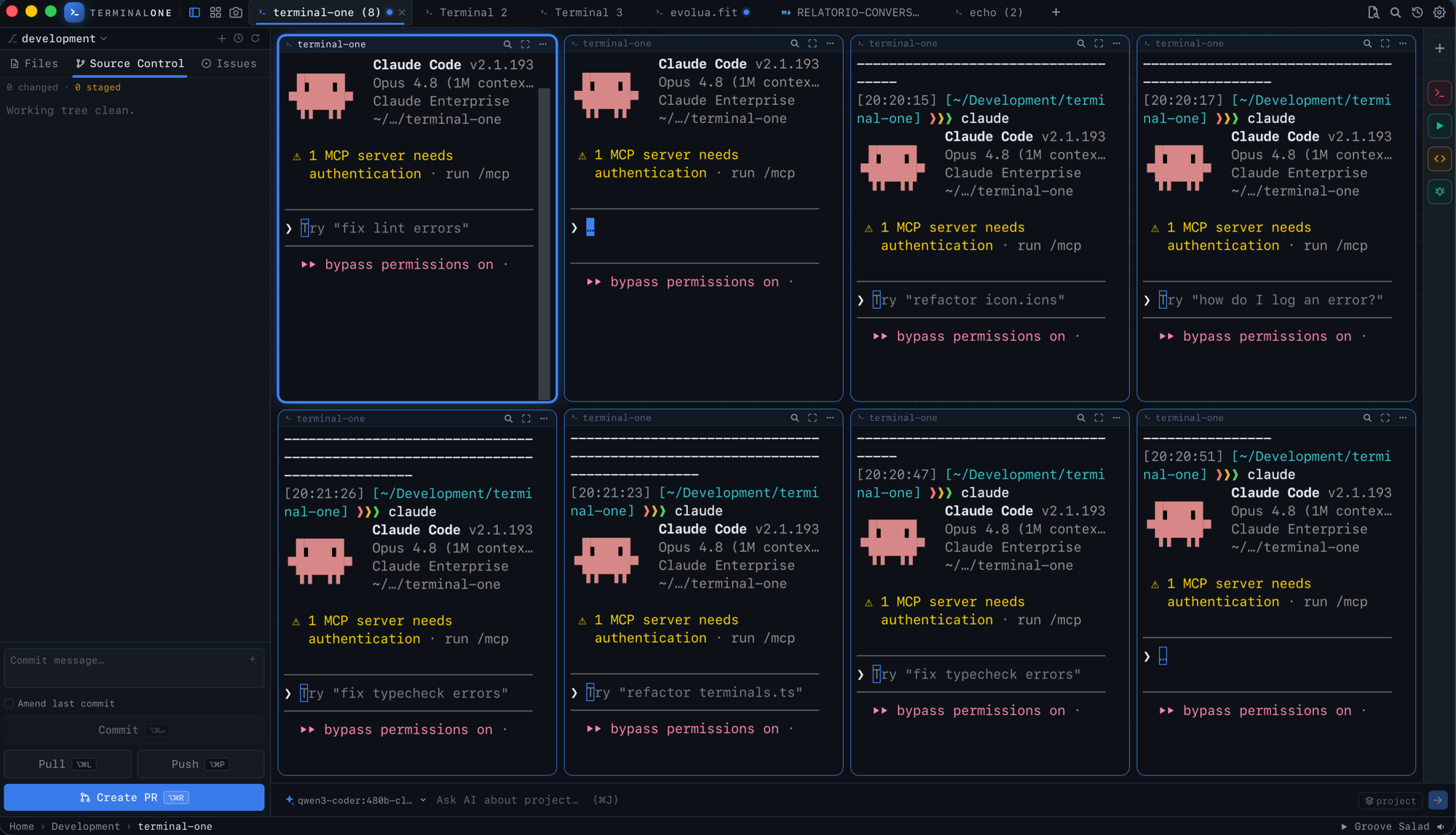
Real screenshot — eight Claude Code agents working one repo, live in a single window.
Supervise a fleet, not a pile of tabs.
Agents are only fast if you can tell what they're doing. Terminal One keeps every one of them visible — and interrupts you only when it matters.
- Live status on every pane Thinking, needs input, done — glanceable badges on each tab, so a half-second peek tells you where you're needed.
- Get pulled in only when it matters Let agents run in the background; an OS notification fires the moment one finishes or blocks on a question.
- Pick up any session where it left off Yesterday's Claude Code run is one click away — past agent sessions are listed per project and resume with their full context.
From issue to merged PR, without leaving the window.
AI sits in every step of the loop — and it runs on your own model keys, never through our servers.
Spec it
Drop in a GitHub issue and a PM → Architect → Reviewer pipeline writes an audited PRD — grounded in your real files and dependencies, not guesses.
issue → PRDBuild it
Run any coding agent in a pane — or the built-in tool-using agents that read files, search the codebase and edit code until the task is done.
agent modeReview it
One click reads your working-tree diff and its call-sites, then flags bugs, security holes and perf risks — each with a fix you can apply instantly.
risk + fixesShip it
AI drafts the commit message and full PR description from the diff, creates the branch, pushes, and opens the pull request. One shortcut.
⌘⌥RAsk it
A code-aware assistant that already knows your repo, branch and diff. Gemini, OpenAI, Claude or local Ollama — always on your own keys.
⌘JPlus AI commit messages, explanations of any commit or diff, and one-line scripts written from a description. The whole loop — free, on your machine.
Everything you alt-tab for, in one window.
Terminal, version control and editing together. No tab-juggling, no context loss.
Split-pane terminal
Tabs with nested split panes, each a real shell — so multiple agents can work the same project side by side.
Source control, built in
Stage by file, hunk or line. Commit, push, pull, stash, amend — with live ahead/behind counts, without leaving the window.
History and diffs
Browse the commit log, inspect any commit's diff, resolve 3-way merges, manage branches and worktrees.
A real editor
A proper editor and file tree beside the terminal. Read, edit and navigate the whole project without opening a second app.
GitHub issues & PR review
Triage issues, review pull requests with inline comments, and keep the whole GitHub loop inside the same window.
Keyboard-first, native and light
Every action has a shortcut. Built on Tauri and Rust: a small, fast binary that honours your existing config.
And the rest of the box.
Everything you reach for in a day of shipping, in a single native binary.
- Split-pane terminal & tabs
- Hunk & line-level staging
- Commit graph & history
- Inline git blame
- 3-way merge conflicts
- Git worktrees
- Branch management
- AI commit messages
- AI pull requests
- PR review + inline comments
- AI code review with fixes
- Issue → PRD pipeline
- Code-aware AI chat
- Tool-using AI agents
- Agentic Kanban board
- Gemini · OpenAI · Claude · Ollama
- Command palette & fuzzy finder
- In-page & terminal search
- Project & global notes
- Editor + live Markdown preview
- AI-generated quick scripts
- GitHub issues
- Image diffs
- Session resume
- Live agent status badges
- Screenshot blur & redaction
- Lo-fi radio
- Auto-updates
- Keyboard-first
Pro removes every cap.
The full workflow is free. Pro is for the day your fleet outgrows it: unlimited agent panes, plus the power tools around them.
Multi-agent orchestration, uncapped.
Run as many agent panes as your machine can hold — Claude Code, Codex, Aider, custom scripts — in parallel, in the background, with live status on every tab.
- Unlimited agent panes working side by side
- Background execution with OS notification alerts
- Live phase badges — thinking, input needed, done
Show your agent. Don't describe it.
Agents live in text, but half of what you want to fix is visual. Terminal Shot exists to close that gap: press ⌘⇧S anywhere on your Mac, drag a region, and it's on your clipboard — ready to paste straight into Claude Code or any agent pane.
- Works from any app — the capture never steals your focus
- Annotate in the floating tray — arrows and text to point at exactly what's wrong
- One paste beats three paragraphs — pixels are the fastest prompt
Agentic Kanban. Let AI drive the board.
Coordinating work across multiple directories and agents can get messy. Terminal One includes a global, agent-aware Kanban board that automates task tracking: agents read and update columns as they work, and a custom CLI shim puts control in your own shell.
- Autonomous updates — Built-in agents use custom tools to add, update, and move tasks as they write code.
- t1-kanban CLI — Shimmed onto every terminal's PATH to read or update the board directly from git hooks, bash scripts, or manual commands.
- Project-aware context — Tasks are automatically tagged by repository directory, keeping your dashboard clean across multiple workspaces.
Session resume
Yesterday's Claude Code session, back in one click — past agent sessions are listed per project and resume with their full context.
Agent notifications
OS notifications the moment an agent finishes or needs your input — each with a one-line AI summary of what just happened.
No borrowed logos. Just verifiable claims.
Terminal One is new, and we won't pretend otherwise. What we can offer is better than testimonials: claims you can check yourself in five minutes.
The honest pitch: download it, open your messiest repo, and run one agent while you review a diff. If it doesn't feel faster than your current setup, delete it — it's a 13 MB binary and it never asked for your email.
Free for the craft. Pro for the fleet.
Everything you do solo is free, forever. Pro is $8 when you put your agents to work.
Free
The full terminal IDE, on your machine.
No account needed
- Split-pane terminal, source control & real editor
- AI commit messages, PRs & code review
- Issue → PRD spec pipeline (PM · Architect · Reviewer)
- Code-aware AI assistant — bring your own key
- Run any agent CLI in a pane (Claude Code, Codex…)
Pro
Unlimited agents, plus the power tools.
Sign in and upgrade from inside the app
- Everything in Free
- Unlimited concurrent agent panes
- Agentic Kanban board — automatic task updates driven directly by your agents
- Terminal Shot — capture & annotate any screen region (⌘⇧S)
- OS notifications with AI summaries when an agent finishes or needs you
- One-click resume of past agent sessions
Download free, then unlock Pro in seconds — sign in with Google or GitHub and tap Upgrade. Cancel anytime.
Questions, answered straight.
The short version of everything people ask before downloading.
Which platforms are supported?
macOS first. Windows and Linux are on the roadmap, since the app is built on Tauri.
Which AI agents does it work with?
Any agent that runs in a terminal works out of the box: Claude Code, Codex, Aider, opencode and others — using any provider, free. Every pane is a real shell. Pro adds unlimited panes, notifications and session resume.
What can the built-in AI actually do?
A lot, all on your own model keys: it writes commit messages and full PR descriptions from your diff, reviews your working tree for bugs, security and performance risks (with concrete fixes), turns a GitHub issue into an audited PRD via a PM → Architect → Reviewer pipeline, explains any commit or diff, and answers questions with full knowledge of your repo, branch and changes. It can also autonomously read files, search the codebase, edit code and execute complex tasks with built-in tools. Pick Gemini, OpenAI, Claude or a local Ollama model.
Does it work with my existing git setup?
Yes. It shells out to your installed git, so your config, credentials and hooks all apply, exactly as on the command line.
Is my code private?
Yes. Your terminal, files and git all run locally, so your code never touches our servers. The built-in AI uses your own API keys and talks directly to the provider you choose (Gemini, OpenAI, Claude or a local Ollama model); any agent CLIs you run are the same ones you already use. See our Privacy Policy for the details.
What's the difference between Free and Pro?
Free gives you the whole terminal IDE (terminal, git, editor and AI agents in a pane — any provider) with no limits on the core experience. Pro adds the power tools: unlimited agent panes, the Agentic Kanban board (coordinate tasks with agents automatically), Terminal Shot (capture and annotate any screen region from anywhere), notifications when an agent finishes or needs input, and one-click resume of past agent sessions.
What is Terminal Shot?
A built-in screen-capture tool that works anywhere on your Mac — not just inside Terminal One. Press ⌘⇧S from any app, drag to select a region, and the shot is instantly on your clipboard and in a floating tray. From the tray you can annotate it (arrows, text) or re-copy it, without the capture ever stealing focus. It's a Pro feature.
What is the Agentic Kanban board?
It is a built-in, local-first board designed for coordinating work between you and your AI agents. Built-in agents have access to tools to automatically list, add, update, and move tasks as they work. You also get a `t1-kanban` CLI tool shimmed into your shell's PATH, so you can inspect, add, or move tasks directly from git hooks, automation scripts, or your own PTY sessions. It is a Pro feature.
Do I need an account?
Not for the free app; it runs entirely on your machine. You only sign in for Pro, to unlock the agent-orchestration power tools.
How do I get Pro?
Download the free app, sign in with Google or GitHub, and tap Upgrade to Pro. You're taken to secure Stripe checkout in your local currency, and Pro unlocks the moment payment goes through — on every machine you sign in on. Cancel anytime; you keep Pro until the period you paid for ends.
Is it really free?
Yes. The full terminal, git, editor and AI workflow are free, forever, with no account required. There's no catch: Pro is a separate, optional plan for people who want to orchestrate many AI agents at once.
Your agents are ready to work.
One native window for the whole loop — terminal, git, editor, AI. Free on macOS, running in under a minute.